
.png)

National Intercollegiate Women's Fencing Association
Creating a centralized, searchable, and scalable archive of the NIWFA's championship results to improve usability for coaches, fencers, alumni, and administrators.
Project Overview
The National Intercollegiate Women’s Fencing Association (NIWFA) is the oldest women’s collegiate fencing organization in the United States, hosting annual championship tournaments and maintaining records of team and individual results. Currently, these results are scattered across multiple documents and formats, making it difficult for users to quickly access historical data.
The challenge is to create a centralized, searchable, and scalable archive that improves usability for all stakeholders while reducing the administrative burden of maintaining and updating the data.

-
Led end-to-end UX design of the NIWFA Digital Archive, from research to coded implementation
-
Aligned stakeholders and defined business goals for long-term scalability
-
Designed and tested IA, filtering, and mobile accessibility features
-
Built custom Wix Velo + Google Sheets CSV integration for real-time updates of decades of fencing results
-
Collaborated with NIWFA leadership and technical advisors to ensure historical accuracy
My Role: UX/UI Designer & Researcher
Research Goals
-
Identify who would be using the archive the most and how frequently
-
Understand pain points in accessing historical fencing results.
-
Explore preferred ways to filter and search the data
-
Ensure the archive is intuitive, accessible, and scalable for long-term maintenance.
-
Determine device preferences to inform responsive and mobile-first design decisions.
Research Questions
-
Who are the primary and secondary stakeholders of the NIWFA archive?
-
What are the most common pain points with the current archive system?
-
What specific archive functions would most improve usability?
-
How could a more robust archive improve NIWFA’s business operations?
-
How important is mobile access and speed for archive searches?
Design Process

Initial CMS Integration
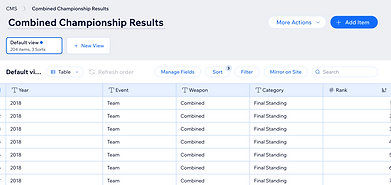
The archive was initially integrated into Wix CMS, allowing data to be displayed and filtered. While functional, stakeholders raised concerns about scalability and maintenance as new results were added each year.
Data Structuring
Results were organized to include year, team and individual results, weapon, overall rankings, schools, fencer names, and trophies. This is similar to the data present on current archives.

Embedded Google Sheet (Alternative Solution)
Another scalability approach considered was embedding the actual Google Sheet directly into the Wix site. While this would have reduced maintenance effort, it would have limited usability for users because filters and interactive search functionality would not be possible.
CSV-Based Solution (Chosen Approach)
To address scalability, the published Google Sheets CSV was connected to the Wix site using custom code. This allowed dynamic updates from a single source, reducing maintenance overhead and supporting future data expansion. It also allowed for filters to be connected to the data, making it easier for users to narrow down searches.


Filter Function Implementation
Dropdown filters for year, event type,weapon, school, and fencer, along with a reset button, were implemented. Users can select one or multiple categories, or reset to view all results, making the archive interactive and user-friendly.
Strategic Design Decision
The existing archive design uses separate pages for each championship, which keeps results organized but requires users to constantly switch pages to find information. From a user standpoint, this creates unnecessary friction and slows down comparisons across years or categories. From a business standpoint, maintaining dozens of pages over time would not scale efficiently as more data is added. To address both challenges, I implemented a filter-based design that consolidates all results into a single archive. Users can now search by year, weapon, school, event, or fencer without leaving the page, making the archive easier to navigate while also ensuring the system is more scalable and maintainable for the NIWFA in the long term.

The current archive is not very scalable, as new data must be manually added each year. Additionally, users need to navigate to separate pages to compare results from different championships.

The updated archive lets users filter results while pulling data directly from a CSV, ensuring the archive stays current and up to date.
What I Learned
I learned how to balance business needs with user experience when making strategic design decisions. While stakeholders initially suggested embedding a Google Sheet to simplify scalability, I defended a coded CSV integration that would support filters. This approach required more effort to implement but ultimately created a more scalable, user-friendly archive.
Impact
By aligning stakeholders on the value of usability, the archive now updates dynamically from Google Sheets while supporting advanced filtering. This improved the long-term sustainability of the system and delivered a significantly better user experience, making decades of NIWFA results accessible and easy to navigate.